Webflow review
8.3The right answer when you know what you want it to look like and refuse to compromise.
| Ease of use | 6.4 | |
|---|---|---|
| Design | 9.4 | |
| Flexibility | 9.6 | |
| Value | 7.2 | |
| Support | 7.8 |
What's good
- Pixel control without writing code
- Clean exportable HTML/CSS
- CMS is genuinely flexible
What's not
- Real learning curve — it is a design tool, not a wizard
- Costs add up across site and CMS plans
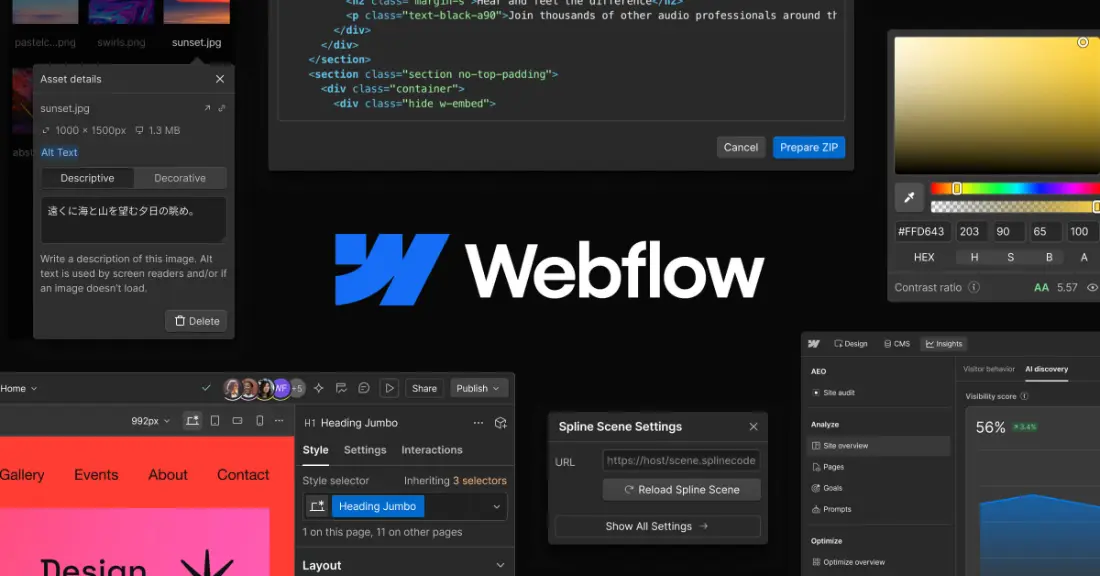
Webflow is what designers use when a template builder is too limiting and hand-coding is too slow. You work visually, but the thing you are manipulating is real HTML and CSS: boxes, classes, flexbox, grid. The result can look like anything, and it is clean enough that developers do not wince at it.
That is also why it is not for everyone. Webflow expects you to understand, roughly, how a web page is built. If you do, it is the most capable visual builder there is. If you do not, you will spend your first week learning concepts instead of building a site.
Add-ons push up the bill
Several things other builders include are separate purchases on Webflow. Translating the site into another language is the Localize add-on, from $9 a month for one extra locale on the Essential tier to $29 a month on Advanced, which adds localised URLs and automatic visitor routing. Site analytics is Analyze, from $9 a month depending on sessions. A/B testing and personalisation are Optimize, from $299 a month. None of them are required, but budget for them if you know you need them.
A steep start that pays back
Webflow's designer exposes the box model, classes and layout systems directly. That is a feature: once you understand it, you can build layouts no template builder allows, and the site stays maintainable because styles are reused through classes. But it is a design tool, not a wizard. Budget time to learn it, or budget for a Webflow designer; there is a large market of them precisely because the tool is powerful.
Editing after launch
Once the site is built, clients and colleagues can edit text and CMS content without touching the design, which makes Webflow a strong choice for agencies handing sites over. Team features such as publishing workflows and single-page publishing sit on the Team platform plan at $2,500 a month, which is aimed at organisations, not small businesses.
Leaving Webflow
You can export the HTML, CSS and JavaScript of a site, which is unusual in this category and a genuine safety net. What does not come with it in working form is the CMS: dynamic content has to be rebuilt on whatever platform you move to.
Pricing
From USD 15/mo · Webflow pricing
Who it's for
Agencies, designers and marketing teams who know exactly what the site should look like and will not accept a template's compromises. The CMS is genuinely flexible, and clean exportable code means the work is not trapped.
Who it isn't for
A first-time site owner in a hurry. The learning curve is real and measured in days, not minutes. If the goal is to be online by tomorrow, this is the wrong tool.
Limits worth knowing
- Real learning curve — it is a design tool, not a wizard
- Site plan and workspace seats are billed separately and add up
- Ecommerce is capable but thinner than Shopify
- CMS item limits are per plan and can force an upgrade
Questions people ask
Do I need to know how to code to use Webflow?
No, but you need to understand layout. Webflow exposes the box model, flexbox and grid directly. You will not write CSS, but you are working with the same concepts, and that is what makes the curve steep.
Can I export my Webflow site?
Yes on paid workspace plans — clean HTML, CSS and JavaScript. CMS content and form handling do not come with it, so an exported site is static. It is a genuine exit, with caveats.
Webflow or WordPress?
Webflow for design control without maintenance. WordPress for ecosystem breadth and full ownership, accepting that you run hosting, updates and security. Webflow costs more monthly and less in time.
Is Webflow good for SEO?
Yes. Clean markup, full control of titles, descriptions, canonicals and redirects, fast hosting on a CDN, and structured data support. It removes most of the technical obstacles rather than creating them.
The bottom line
Webflow is the right answer when the design matters enough to justify learning a serious tool, or paying someone who already knows it. Start on Basic for a fixed-page site, or Premium the moment you need a blog or any repeating content.
If you want something that looks good by default and does not ask you to think about layout systems, Squarespace or Wix will get you there faster.
Sources
Read next
Compare
All reviews
Some links on PlatformZoo are affiliate links, so we may earn a commission if you sign up, at no extra cost to you. That never affects a score: every tool is scored on the same rubric before any link is added.